Learn the world's most powerful reporting tool with one of the top ranked trainer in Excel
SEND THE SYLLABUS
Microsoft Excel remains one of the most powerful and advanced business tool as it is widely used by individuals and corporate to manage and analyze their data. It isn’t surprising how Excel has been dominating the spreadsheet product industry with a share of more than 90%. Businesses have relied on Excel to improve the productivity level of employees. Microsoft Excel is everywhere in any professional & business environment, and advanced Excel skills are welcome in almost everywhere.
As one of the most used reporting and analytics tools today, Microsoft Excel is a mandatory skill that employees should have. Today Excel is a must know tool for any job. It is no wonder that companies demand that their employees must learn Excel so that they can stay competitive. These days, any designation requires that you work with data.
Learning Excel in a proper, structured way can not only help you save time, but it will also help you become better at your job and can give you time to focus on things that matter. Microsoft Excel Masterclass is the most preferred choice for everybody looking to grow and survive in the industry.
This course is designed by a Mr. Vivekananda Sinha based on his 15+ Years of experience in Microsoft Excel Reporting, Data Analysis & Automation. This course is highly beneficial from freshers to professional who are looking for great career in analytics. Aspirants who want to start with a great profile such as Reporting Analyst, Data Analyst, MIS Analyst, Business Analyst as a fresher this course is highly recommended.

Learn Excel Core Capabilities
DATA CONSOLIDATION
This is one of the most demanding skills in the industry now a days. Excel offers flexible consolidation options depending upon the scenario. This course gives you in-depth knowledge of consolidating data in Excel.
CREATE MIS REPORTS
Excel is the industry leader when it comes to MIS Reporting. Creating awesome reports in Excel is quiet interesting. The thing is to know the perfect way. You will learn to create professional MIS reports in Excel.
DATA ANALYSIS
After you have created reports, the next step is to analyze the data and extract meaningful business information. Excel offers you tons of tools for data analysis. This course will develop your data analysis skills.
PERFORMANCE DASHBOARDS
Excel reports are incomplete without dashboards. Developing dashboards in Excel is quiet interesting. Creating dashboards will make you a rockstar in office. This course will guide you to create stunning dashboards.
REPORT AUTOMATION
Automation industry is booming. We has to upgrade from manual reporting to automated reporting in Excel. The thing is to know the proper skills. This course will train you to automate Excel reports and dashboards.
DECISIONS MAKING
Eventually, every data has to be transformed into a right decision. Excel has its powerful What-If Analysis tools that helps you to take right decision. This course will train you to take the data enabled decisions.
YEARS of EXPERIENCE
STUDENTS TRAINED
COMPANIES ENGAGED
INDUSTRIES COVERED
Detailed Syllabus
- Microsoft Excel Version History
- Version wise Features Comparison
- Advantages of Microsoft Excel
- Quick facts and figures about Microsoft Excel
- What's new in Microsoft Excel
- Portability features with earlier versions
- Application Areas of Microsoft Excel
- Microsoft Excel and Analytics
- Microsoft Excel and BIG Data
- Excel Beyond Excel
- Understanding Excel Navigation System
- Transformation from Menus to Ribbon
- Overview of Ribbon, Groups & Tabs
- Customizing Excel Ribbon
- Importing and Exporting Customization Settings
- Understanding Contextual Tabs
- Overview of Quick Access Toolbars
- Adding and Removing tools from Quick Access Toolbar
- Navigating Back Stage View
- Understanding Modules of Back Stage View
- Excel Keyboard Shortcuts
- Format Cell Basics
- Navigating Format Cells Dialog Box
- Understanding Excel Data Types
- Understanding Custom Formatting
- Transformation from Data Type to Custom
- Creating custom Date Formatting
- Creating custom Time Formatting
- Creating custom Number Formatting
- Creating custom Text Formatting
- Conditional Custom Formatting
- Custom Color Formatting
- Format Cells to multiple places
- Keyboard Shortcuts for Cell Formatting
- A walkthrough to Formatting Options in Home Tab
- Working with Paste Special - Magical
- Splitting Data using Text to Columns
- Sorting Data with Basic & Custom Options
- Working with Excel Comments
- Working with Goto Options – Magical
- Working with Freeze Panes
- Working with Grouping & Subtotals
- Excel Security – Protecting a Selected Range
- Excel Security – Protecting an Entire Sheet
- Excel Security – Allow users to edit Range
- Excel Security – Protecting Workbook Structure
- Excel Security – Full Protection of Workbook
- Excel Security – Partial Protection of Workbook
- Working on Excel Data Backup
- Introduction to Cell Referencing
- Importance of Cell Referencing
- Understanding Relative Referencing
- Understanding Absolute Referencing
- Understanding Mixed Referencing
- Common challenges while using Referencing
- Difference between Functions & Formulas
- Concept of Nested Formulas
- Formula Auditing
- Various Calculation Modes and How to use them
- Circular References – What are they?
- Concept of Wild Cards
- Concept of important Functions: AND, OR, NOT, COUNT, COUNTA, COUNTBLANK, COUNTIF, COUNTIFS, MAX, MIN, LARGE, SMALL, UPPER, LOWER, PROPER, RIGHT, LEFT, MID, SEARCH, TEXT, VALUE, POWER, SUM, SUMIF, SUMIFS, AVERAGE, AVERAGEIF, AVERAGEIFS, EXACT, CONCATENATE, LEN, SUBSTITUTE, NETWORKDAYS, NETWORKDAYS.INTL, DATE, TIME, DAY, MONTH, YEAR, HOUR, MINUTE, SECOND, WORKDAY, WORKDAY.INTL, EOMONTH, DATEDIF, VALUE, INT, ISERROR, ISTEXT, ISNUMBER, ISBLANK, ISODD, ISEVEN, MATCH, INDEX, IF, VLOOKUP – 1D, VLOOKUP – 2D, Reverse LOOKUP, HLOOKUP, CHOOSE, RANDBETWEEN, ROW, ROWS, COLUMN, COLUMNS, MOD, IFERROR, SUBTOTAL, SUMPRODUCT, OFFSET, ADDRESS, INDIRECT, REPT
- Combinations of the above Functions
- Data Consolidation using 3D Formulas
- Concept of Precedents
- Concept of Dependents
- Introduction to Name Management in Excel
- Overview of Name Box
- Creating, editing and deleting Name
- Understanding Name Scope
- Defining Static and Dynamic List using names
- Displaying Name Map in Excel Worksheet
- Creating Single and Multidimensional Arrays using Name Manager
- Use of Names in advance Reports
- Common challeges in Name Management
- Use of Name Manager for Extracting Data - The Magical
- Introduction to Data Validation
- Creating basic Data Validation
- Creating Data Validation for Test
- Creating Data Validation for Numbers
- Creating Data Validation for Date and Time
- Creating basic drop down list using Data Validation
- Creating dynamic list using Data Validation
- Creating Basic Dependent List
- Creating Multilevel Dependent List
- Use of Basic Formulas in Data Validation
- Creating complex validation using Formulas
- Hacks of Data Validation
- Applying Data Validation to Multiple Places
- Using Custom Error Alerts in Validation Conflicts
- Using Data Validation as a Smart Comments
- Steps to remove Data Validation
- Highlighting Invalid Data
- Introduction to Conditional Formatting
- Understanding Static vs Dynamic Formatting
- Text based Conditional Formatting Rules
- Numbers based Conditional Formatting Rules
- Date based Conditional Formatting Rules
- Dealing with Unique and Duplicates in Conditional Formatting
- Top and Bottom Rules in Conditional Formatting
- Introduction to Data Bars, Icon Sets, Color Scales
- Creating Dashboard using Conditional Formatting
- Creating Conditional Formatting using Basic Functions
- Use Single Formatting with Multiple Conditions
- Implementing Conditional Formatting in Attendance Trackers - Case Study
- Using Complex Formulas in Conditional Formatting
- Setting Priorities on Conditional Formatting Conflicts
- Developing Smart Signalling System using Conditional Formatting
- Reusing Conditional Formatting
- Clear Conditional Formatting Rules
- Introduction of Excel Tables
- Power of Excel Tables
- Time Saving features of Excel Tables
- Calculation Logic of Excel Tables
- Format As Table
- Understanding Table Formatting Options
- Multiple Filters In The Same Sheet
- Total Row, Ability To Select Type Of Summary
- Structured References – What Are They?
- Advantages Of Tables
- Convert Table To Named Range
- Compatibility Of Tables With Earlier Versions
- Limitation of Excel Tables
- Introduction to Charts
- Understading elements of Chart
- Activating Chart Elements
- Major charts used in Industry
- Visualizing data using Column Charts
- Visualizing data using Bar Charts
- Visualizing data using Line Charts
- Visualizing data using Pie Charts
- Creating Combination Chart
- Changing Chart Themes
- Using Picture in Charts
- Introduction to Tiny Charts – Sparklines
- Creating Column Sparklines
- Creating Line Sparklines
- Creating Win-Loss Sparklines
- Introduction to Advanced Charting
- Why PivotTables?
- Structuring Your Source Data
- Inserting Your First PivotTable
- Navigating the Field List
- PivotTable Options: "Analyze" & "Design"
- Selecting, Clearing, Moving & Copying Pivots
- Refreshing & Updating Pivots
- Generating New Report from PivotTable
- Managing Grand Totals
- PivotTable Subtotals
- Dealing with Growing Source Data
- Removing & Reviving Data from Cache
- How PivotTables Works?
- Format Cells vs Number Format
- PivotTable Number Formatting
- Automatically Formatting Empty Cells in PivotTable (Pro Tip)
- Understanding Table Layouts & Styles
- Customizing Headers & Labels
- Introduction to Data Sorting in PivotTable
- PivotTable Sorting Options
- Filtering Data in PivotTables
- Filter using Wild Cards
- Using Slicers & Timelines to Filter Data
- Controlling multiple Pivots using Slicers and Timelines
- Working on PivotTable Grouping
- Date Grouping in PivotTable
- Grouping in Numbers and Text
- Value Summarization Modes
- Working on "Show Values As" Calculations
- Performing custom calculations using Calculated Fields
- Calculations in Pivots vs. Raw Data
- Inserting a Calculated Item for combined calculation
- The Solve Order & List Formulas Tools
- Introduction to PivotCharts
- Applying Slicers & Timelines to Multiple Charts
- Building dynamic dashboards using Slicer and Timeline
- Consolidating data from multiple sheets in few seconds
- Consolidating data from multiple files in few seconds
- Creating custom Page in PivotTable
- Splitting Data to Multiple Reports from huge data in seconds
- Developing Dynamic Tutorial using Slicer and Pivot (Pro Tip)
- Challenges in PivotTables - What Next?
- Introduction to Excel Filter
- Data Filtering Techniques
- Introduction to Auto Filter
- Auto Filter Checkbox
- Filter using free text
- Using predefined modes in Text Filter
- Using predefined modes in Number Filter
- Effectively using Custom Filters
- Using Color Filtering
- Conditional Formatting Icons Filtering
- Filter using wild Cards
- Refershing modified data while keeping Filter Intact
- Challenges in Auto Filter
- Introduction to Advance Filter
- Exploring Advance Filter Dialog Box
- Advance Filter Modes
- Implementing AND, OR, NOT in Advance Filter
- Advance Filter with basic calculation
- Using Excel Funtions in Advance Filter
- Using Advance Filter as a Lookup Tool
- Extracting unique list with Advance Filter
- Clearing Filters
- Introduction to Arrays
- Introduction to Excel Array Formulas
- Why and when to use Array Fomulas?
- The internal logic behind Arrays
- Concept of Logical Operators in Array Formulas
- The CSE Method
- Comparision Matrix with Excel conditional functions
- Array Formulas using basic Excel Functions
- How to create complex Array Formulas?
- How to Master Array Formulas - What Next?
- Introduction to What-If Analysis
- Why and when to use What-If Analysis?
- Working with Goal Seek for Reverse calculation
- Multiple case studies on Goal Seek
- Challenges in Goal Seek
- Working with Data Table for Sensitivity analysis
- Understanding 1 Variable and 2 Variables Data Table
- Selection Mechanism in Data Table
- Developing Bank Loan comparision analysis using Data Table
- Working with Scenario Manager for Scenarios Management
- Understanding Input & Output Variables in Scenario Manager
- Bank Loan Scenario Management - Case Study
- Introduction to Solver Add-In
- Understanding Algorithms and Optimizations
- Why and When to use Solver
- Creating Business Models
- Case Study - Resource Management
- Case Study - Logistics Optimization
- Case Study - Salary Management
Plus Get 3 Bonus Capsule Trainings
With this Course, you will get 3 highly specialized capsule trainings. Capsule training focus on the in-depth training of most important areas of Excel. These are designed to make you an expert & specialized into that area.
EXCEL ARRAY FORMULAS
This is one of the most important area when it comes to create customized Excel Formulas. Master in creating complex formulas in Excel with our Excel Array Formulas Capsule..
EXCEL LOOKUP FORMULAS
Excel Lookup formulas are the champ when it comes to search something from a source data. There are tons of Lookup formulas. This will give you in-depth knowledge of everything in Lookups.
EXCEL PIVOT TABLE
Excel Pivot Table is the most important Reporting, Data Analytics, Dashboard Development tool. There are tons of things to d in Pivot Table which you will lern in this Capsule Training.
Detailed Syllabus of Capsule Training
- Introduction to Array
- Array Basics
- Why Arrays?
- When to use Array?
- The Power of Array Formulas
- Array and Range?
- Types of Arrays
- Creating Array Constant
- Array name management
- Using Intersect and Union Methods?
- Working with Logic gates - OR, NOT, NAND, NOR
- The Truth Table
- The CSE Method
- IF with Arrays
- Working with Conditional Logic
- Building Array Algorithm
- Basic examples of Array Formulas
- Replacing current Functions with ARRAY
- Creating Array Series with ROW, COLUMN Function
- Array Formula Lookup Example
- Array with Wildcards
- Array with Dates
- Array with Series of Instructions
- Array Formula Complex Example
- The SUMPRODUCT and its array capabilities
- Array with Data Validation
- Working with complex Array Formulas
- Challenges in Array Formula
- Working with Dynamic Arrays (NEW)
- Introduction to Excel Lookup
- Core functions - VLOOKUP, HLOOKUP, LOOKUP, INDEX, MATCH, CHOOSE, TEXTJOIN
- The Magical XLOOKUP
- The Dynamic FILTER Function
- Lookup All records
- Lookup nth records
- Case Sensitive Lookup
- Lookup from Image
- Lookup first integer
- Lookup text
- Index with multiple Range
- The magical MATCH-INDEX
- Reverse Lookup
- Integrating Lookup with Arrays
- Lookup from Multiple tables
- Lookup from Pivot Table
- VLOOKUP with OFFSET
- VLOOKUP with CHOOSE
- Using ROW and COLUMN function in LOOKUP
- The magical ADDRESS - INDIRECT
- VLOOKUP without Source Table
- Dealing with Dynamic Range in LOOKUP
- Fetching data based on multiple condition
- Fetching data based on dynamic range
- Lookup from Multiple Sheets
- Name Management in Lookup
- Working with Complex Lookup
- Pivot Table for Infants - View your Treatments
- Pivot Report Layout - Meet your Clinic
- Changing Indent Level in Compact View
- Pivot Table Dynamic Range
- Working on Classic Pivot Table
- Walkthrough Pivot Table Reports and Calculations
- Counting Distinct Records
- Customize Report Filter Area
- Handling Blank Cells in Pivot Table
- Preserving Formatting and Column Widths on Refresh
- Merging Labels in Pivot Table
- Refreshing Pivot Table - The Manual Approach
- Refreshing Pivot Table - The Permanent Treatment
- Working on Slabs
- Create New Column missing in Data - The Pain Giver
- Customized Sorting in Pivot Table
- Move Values to ROW - The Magical Transpose
- Pivot Table Custom SUBTOTAL - ABRACADABRA
- Pivot Table from Multiple Tables
- Handling Large Data - The Secret Mission
- Changing Multiple Filter in a Click
- Exploring Slicers and Timelines
- Removing Source Data - OOPS Moment
- Pivot Table Formulas - Calculated Field
- Working with Named Sets - No If, No But, Only Pivot
- Lookup Data from Pivot Table - The GETPIVOTDATA
- Consolidate Data from Multiple Worksheets
- Split Data into Multiple Worksheets - Vaccination for Lazy People
- Working on Dynamic Dashboards
- Create Customized View - OMG Format
- Challenges in Pivot Table - What Next?
SEND THE SYLLABUS
MASTERCLASS KEY FEATURES
Industry Level Content
The contents emphasize on the industry level examples and live case studies to make training more realistic & focused.
Certification
This is a certification course where you will get soft copy of course completion certificate once you complete the course.
Actual Batch Videos
The Videos are the recordings of the actual classroom trainings. So you will get the actual classroom learning experience.
Interview Preparation
During the training, we provide you with the interview questions. By this, your interview preparation goes on real time.
Lifetime Access
The entire contents will be there with you forever. So you can revise the class as many time you want.
Practice Files & Assignments
You will have the access to our google drive. After each class, we share you the files, assignments, videos, notes there.
Learn on your comfort
You can learn with your own pace and time. So your learning experience goes the way you want.
Lifetime Support
We are known for our support. You will get the lifetime access to FIH connect to as queries 24/7.
Want to ask something?
WhatsApp UsNOT just like other typical boring HOW-TO information courses
This course gives you detailed insight into basic to Advance Excel concepts, Data mining, Reports preparation, Data Analysis and decision-making tools. At the end of this training you will be able to make award winning reports and powerful dashboards, analyze data like a pro and bring efficiency in your day to day work life.
+ Hours of Training
+ Practice Files
+ Industry Examples
+ Brainstorming Questions
Still thinking whether to join this course?
Ok Mr. Vivekananda Sinha... Why should I join your course ? There are many other courses available.
Please ask yourself a question.. Do you need just how-to information on features, or you are looking for real in-depth concepts? In today's fast moving world, TIME and IMPLEMENTATION is the key to success. Can you afford bitterness of TIME against sweet low cost and courses?
Stay away from self-claimed gurus who will give you just one piece of puzzle. This course has everything you need to work on Microsoft Excel.
Future in Hands is always known for its quality and cost. The price you are investing on yourself will give you high return on investment.
Since 2013, We have trained over 99000+ students accross the globe including corporates and college students. We have delivered this course from Executive level to Sr. Management.
How can I attend this training ?
Once you make the payment, you will get the access to our cloud. It will be Google Drive access. There will be class by class folder. You can attend this training from any device - Laptop, Desktop, Tablet, Mobile.
Is this course a basic or advanced one ?
We cover everything from basic to advanced level. We will start from basic level with STEP by STEP and slowly slowly move to the advanced level. You donot have to do any Excel course in future.
What about Doubts and Queries ?
You will get the access to FIH Connect. It is our Social Networking site for our students only. You can ask queries anytime. There are experts you will clear your doubts & quries. You will have the lifetime access to FIH Connect.
What will be the teaching language ?
Keeping in mind the majority of students, it will be done in both English & Hindi language. You will really find it easy to learn and enjoy the training since they are designed with simple yet in-depth explanations.
How Long can I access Videos ?
You will have lifetime Access to all the contents. One year is more than enough to grab the concepts. However, we are always there to support you lifetime.
How will I get the Training Materials ?
You will have the access to our google drive. We will the class by class videos that contains training files, assignments, videos, theoretical notes into google drive. Each class will have separate folder for easy access.
Is this a Certification Course ?
Yes, this is a certification course. You will get soft copy of the course completion certificate once you complete the course.
Do you also provide Job assistance ?
We believe in Job Ready rather than Job Assistance. The contents we cover are industry oriented. Once you complete the course you will gain high confidence in Microsoft Excel and you can easily crack any Excel based interviews. The contents are trusted by thousands of our happy students. Our Students are the top performers in the industry. However, we have been associated with lots of companies where we help our students placed.
Will I Get Refund?
Honesty, we want serious learners in our eco-system who want to actualy learn and implement the concepts. If you are here just to experiment and doing nothing, please do not waste your valuable time and money. We do not provide refund. But I personally promise that the TRUST & TIME you are investing (forget about money), will be worth for it.
Still want to ask something?
WhatsApp UsSTUDENT SPEAKS...





















Vivekananda Sinha

Learn the world's most powerful reporting tool with one of the top ranked trainer in Excel

15+ Years Experience
Rich industry experience in Reporting and Analytics with big MNC. He is still exploring and learning new technologies.

MCA by Qualification
Packed with programming language, syntax and logic creation. Its a great combination of Programming and Analytics.

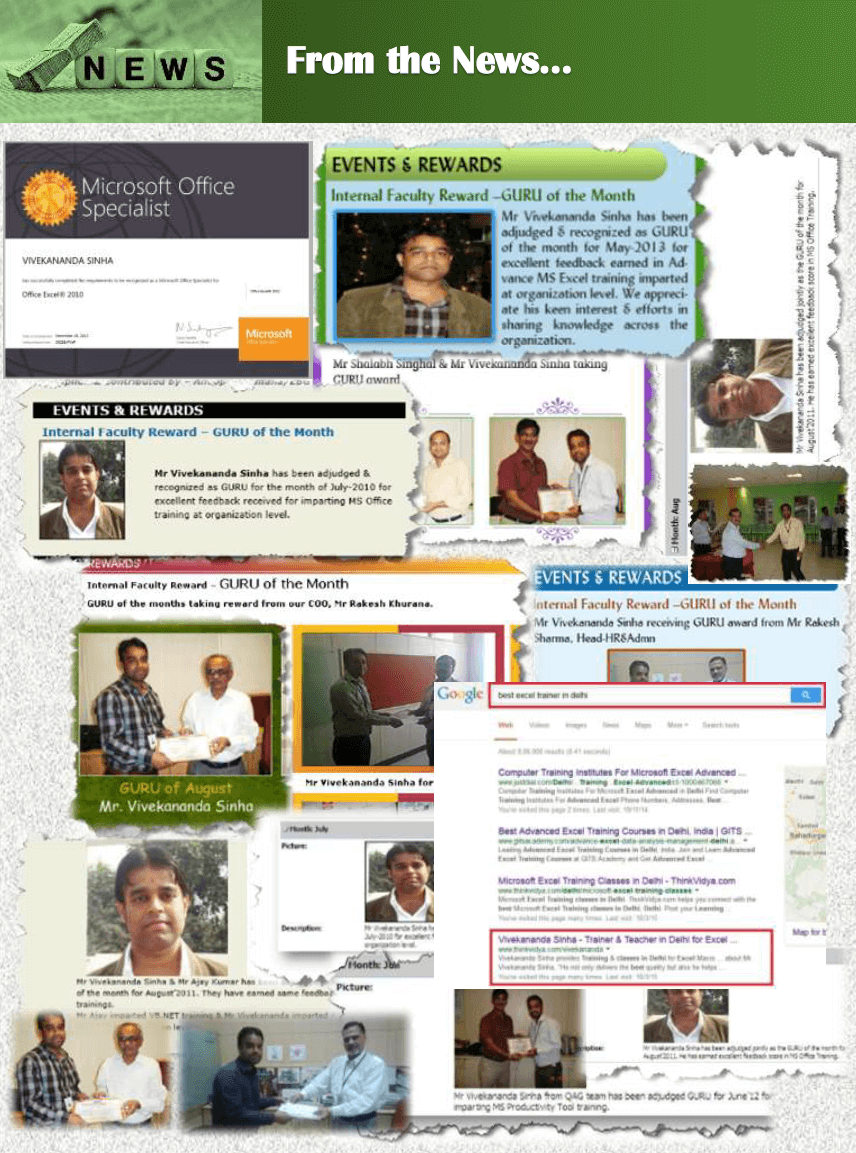
Microsoft Certified
Every skill must to be evaluated. Received Microsoft Office Specialist certification from Microsoft Corporation.

Best Trainer Award
Received several times Guru Award for best trainer for Productivity based workshops conduted for corporates.